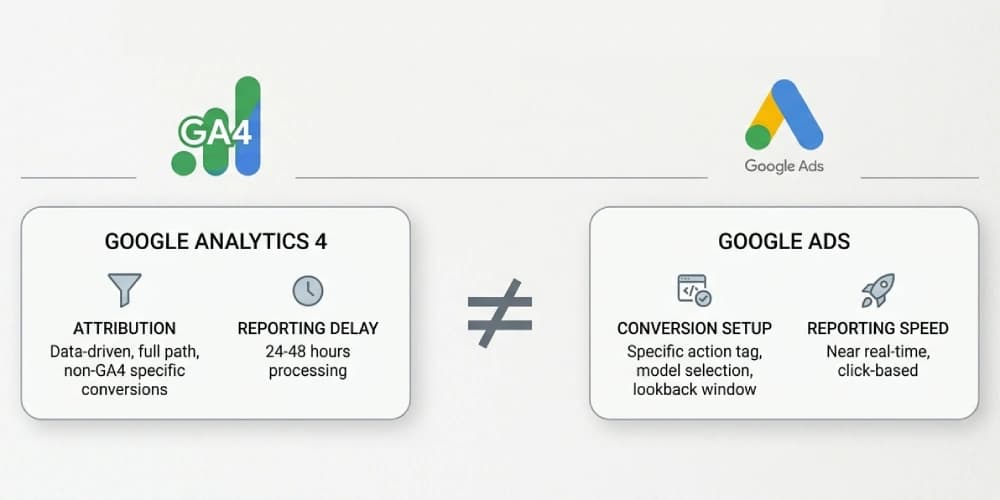
Why GA4 and Google Ads Conversion Numbers Don’t Match
If your team is comparing GA4, Google Ads, and CRM numbers side by side, you have probably heard some version of this:
"Which number is the real one?"
Usually, nobody knows.
That does not mean one platform is broken. It means the measurement system was never designed to make those systems agree on purpose.
This is one of the most common reasons businesses start looking for a Google Analytics consultant. The issue is rarely inside a single report. It sits in the handoff between tracking, attribution, consent, and CRM reality.
The Short Answer
GA4 and Google Ads often report different conversion totals because they:
- use different attribution models
- use different conversion windows
- count different actions as conversions
- handle consent and modeled data differently
- receive data from different implementation layers
A mismatch is normal.
A large, unexplained, or unstable mismatch is a signal that your measurement stack needs work.
The 6 Most Common Causes of Conversion Mismatch
1. You Are Comparing Different Attribution Models
GA4 and Google Ads do not always credit the same touchpoint.
GA4 is designed to analyze user journeys across channels. Google Ads is designed to optimize paid campaigns. That difference changes how each platform assigns credit.
For example:
- GA4 may attribute a lead to organic search after a later branded revisit
- Google Ads may still credit the paid click that introduced the user
If you compare raw totals without aligning attribution settings, the numbers will drift by design.
2. Your Conversion Windows Do Not Match
Google Ads may count a conversion inside its configured click-through window, while GA4 may evaluate the same user action inside a different time range.
This creates a reporting lag that teams often misread as a tracking bug.
Before you troubleshoot tags, check:
- Ads conversion window
- GA4 key event attribution settings
- reporting date source
- whether your team is using click date or conversion date
3. The Same Event Is Not Being Shared Cleanly
Many accounts have this setup:
- GA4 event fires
- GA4 key event is imported into Google Ads
- a native Google Ads conversion tag also fires
Now the same lead can be counted twice in Ads or counted once in Ads and differently in GA4.
This is especially common when forms, booking tools, or ecommerce flows were patched together over time.
If you are running paid media at scale, this is exactly the kind of issue that should be audited before deeper campaign work by a Google Ads consultant.
4. Consent Mode v2 Is Incomplete or Incorrect
In 2026, consent is not optional architecture. It is part of the measurement system.
When Consent Mode v2 is missing or misconfigured:
- GA4 may lose event visibility
- Google Ads may rely more heavily on modeled conversions
- your CRM still shows real leads closing offline
The result is a three-system disagreement that gets worse in privacy-heavy regions and on Safari-heavy traffic.
If this is happening, read Consent Mode v2 for GA4 and Google Ads: What Actually Breaks Without It.
5. Offline Revenue Never Makes It Back Into Google Ads
For lead generation businesses, this is a major blind spot.
GA4 might correctly show a form submission. Google Ads may count that lead. But neither platform knows whether the lead turned into revenue unless your CRM or sales pipeline sends outcomes back.
That means your ad platform can optimize toward low-quality form fills instead of real pipeline value.
This is why offline conversion tracking for Google Ads is not an advanced extra. It is often the missing piece in lead quality measurement.
6. Your Implementation Mixes Client-Side and Server-Side Data Poorly
As more teams move toward server-side tagging, one problem shows up constantly:
- client-side event fires
- server-side event also fires
- transaction IDs or event IDs are not reconciled
Now reporting inflation looks random, but it is actually an architecture problem.
If you are considering this move, do not treat it like a simple tag migration. Use a documented implementation plan like the one outlined in Server-Side Tagging for GA4: When It’s Worth It for Lead Gen and Ecommerce.
When a Mismatch Is Normal vs When It Is Dangerous
Not every mismatch deserves panic.
Usually normal
- small differences between GA4 and Google Ads
- reporting delays
- attribution-driven variation
- variation between click date and conversion date
Usually dangerous
- sudden drops in one platform only
- a gap that keeps widening month over month
- lead counts that do not reconcile with CRM stages
- platform totals changing after implementation changes
- campaign optimization decisions being made on data nobody trusts
The real question is not whether numbers match perfectly.
The real question is whether your team understands why they differ and whether the system is still good enough for bidding and decision-making.
How to Diagnose the Problem Without Guessing
Use this checklist:
- Confirm which events are marked as key events in GA4.
- Confirm which conversions are primary in Google Ads.
- Check whether imported GA4 conversions and native Ads tags overlap.
- Align attribution settings before comparing totals.
- Verify consent behavior for accepted and rejected states.
- Compare platform conversions against CRM-created opportunities or closed revenue.
- Review deduplication logic for server-side and client-side event flows.
If you skip the CRM step, you are not validating measurement. You are only comparing two marketing tools to each other.
What the Fix Usually Looks Like
In most accounts, the solution is not "change one setting."
It is usually a combination of:
- event taxonomy cleanup
- conversion action consolidation
- better key event governance
- consent-mode implementation fixes
- offline conversion imports
- server-side deduplication
- clearer reporting definitions for the team
That is why this problem often lives between analytics consulting and paid-media strategy, not inside a single dashboard.
Final Takeaway
GA4 and Google Ads do not need to match perfectly.
But they do need to make sense together.
If your reporting stack creates doubt instead of clarity, campaign optimization gets weaker, executive trust drops, and budget decisions slow down. That is usually the point where bringing in a GA4 consultant stops being optional and starts being cost control.