Server-Side Tagging for GA4: When It’s Worth It for Lead Gen and Ecommerce
Server-side tagging went from "advanced setup" to mainstream measurement architecture fast.
That happened for a reason.
Browsers are stricter. Ad blockers are more common. Consent requirements are tighter. And marketing teams still need reliable signals for GA4 and Google Ads.
So yes, server-side tagging matters in 2026.
But it is still easy to oversell.
If you are evaluating a Google Analytics consultant or rebuilding your measurement stack, the right question is not:
"Should we use server-side tagging because everyone talks about it?"
It is:
"Will server-side tagging improve signal quality enough to justify the added architecture?"
The Short Answer
Server-side tagging is usually worth it when:
- you run meaningful paid media budgets
- lead or revenue tracking has gaps
- browser privacy limits are hurting attribution
- you need tighter control over first-party data flows
- your business depends on clean signals for bidding
It is usually not worth it if:
- you only need basic pageview tracking
- you have no CRM or conversion pipeline
- your site is small and low-stakes
- your current issue is bad event design, not transport architecture
What Server-Side Tagging Actually Changes
Traditional client-side tagging sends data from the browser directly to third-party platforms.
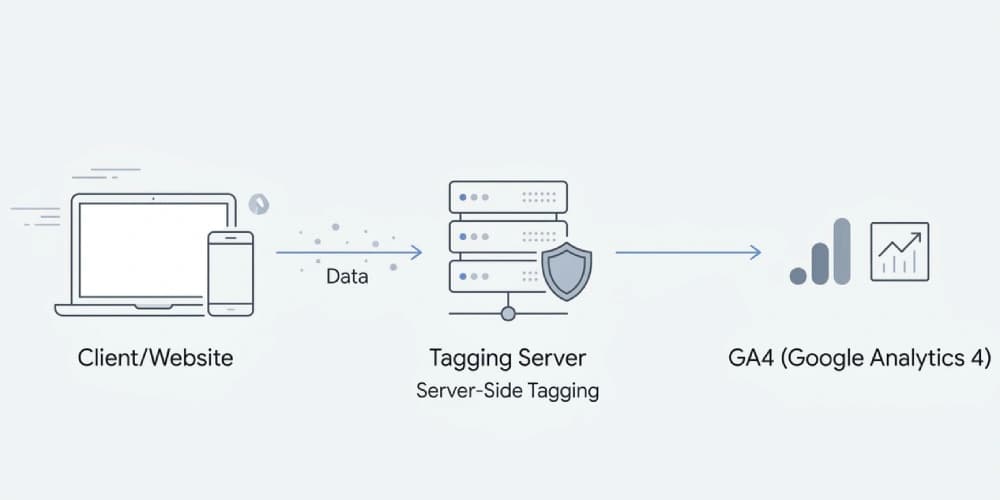
Server-side tagging adds a middle layer:
- browser collects the event
- event is sent to your server container
- the server container forwards and transforms data for platforms like GA4 and Google Ads
That gives you more control over:
- payload structure
- first-party signal handling
- privacy logic
- platform routing
- deduplication strategy
It does not automatically fix a bad measurement plan.
If your events are poorly defined, server-side tagging just moves bad data through a more expensive pipe.
Why It Is Trending Now
The trend is real, and it is not just agency hype.
Three things pushed it mainstream:
1. Privacy and browser restrictions
Client-side tracking is more fragile than it used to be. Safari, Firefox, and privacy-focused environments reduce the lifespan and reliability of browser-based measurement.
2. Consent architecture got harder
With Consent Mode v2, the implementation challenge is no longer just whether a tag fires. It is whether consent state is passed correctly through the whole stack.
If this is part of your roadmap, pair this article with Consent Mode v2 for GA4 and Google Ads: What Actually Breaks Without It.
3. Paid media platforms need better signals
Smart bidding systems perform best when conversion signals are timely, clean, and connected to actual business outcomes. That is why server-side tagging is often part of a broader measurement rebuild that also includes offline conversion tracking.
When It Is Worth It for Lead Generation
For lead gen, server-side tagging becomes valuable when:
- form submissions are underreported
- CRM outcomes are disconnected from ad data
- duplicate event firing is common
- consent loss creates large reporting gaps
- landing pages rely on multiple third-party tools
Lead generation stacks often have multiple breakpoints:
- website form
- CRM handoff
- qualification step
- closed revenue
Server-side tagging helps most when it is part of a full system that connects those stages rather than just improving a single browser event.
When It Is Worth It for Ecommerce
For ecommerce, the case is usually strongest when:
- checkout happens on a separate domain or platform
- revenue attribution is unstable
- purchase deduplication is inconsistent
- client-side scripts are bloated
- paid campaigns rely heavily on purchase value accuracy
In ecommerce, a weak purchase event can damage both reporting and bidding. That is why server-side tagging is often paired with enhanced conversions, purchase deduplication, and tighter data-layer governance.
The Biggest Mistake Teams Make
They treat server-side tagging like a technical upgrade instead of a measurement decision.
That leads to predictable problems:
- the same event fires client-side and server-side
- event IDs are not coordinated
- consent state is not passed correctly
- revenue parameters are inconsistent
- the CRM still remains disconnected
Then the team concludes that server-side tagging "did not work."
Usually, the setup was never fully designed.
A Better Way to Think About the Architecture
The right sequence is:
- Define the measurement plan.
- Decide which business events truly matter.
- Map how those events should move from website to GA4, Ads, and CRM.
- Only then decide which parts should be client-side, server-side, or hybrid.
This is also why the strongest implementations usually come from a combined analytics and paid-media perspective rather than from a purely technical GTM task list.
If your underlying event strategy is still fuzzy, start with How to Build a GA4 Measurement Plan for Lead Generation Websites.
A Practical Checklist Before You Commit
You are a strong candidate for server-side tagging if most of these are true:
- you spend enough on paid media that signal quality materially affects performance
- you already know which conversion actions matter most
- you have a CRM, ecommerce platform, or backend system worth integrating
- you can maintain documentation and QA after launch
- you want a first-party measurement stack, not just a cosmetic upgrade
If most are false, your highest-leverage move is probably cleaning up event design first.
Final Takeaway
Server-side tagging is not a trend to ignore.
But it is also not something to deploy just to look modern.
The best use case is when your business already depends on analytics accuracy and paid-media signal quality, and you want a more durable measurement foundation for the next few years. When that is the goal, a GA4 consultant should be thinking about server-side tagging as part of a larger first-party data strategy, not as a standalone technical project.